

Singapore SMEs lose an average of 168 working days a year to admin work, costing roughly S$160,000 annually, which is double the global SME average of S$80,000. That's almost half the working year gone to tasks that don't grow the business. If you're setting up a new SME, how you handle back-office operations from day one will decide whether you spend your time chasing paperwork or chasing growth.
What is “Back-Office Operations”?
Back-office operations are the administrative, technical and support functions of a company that do not directly interact with customers or directly produce revenue. They form the core infrastructure required to keep a business running, such as:
- Financial & Accounting: Payroll, accounts payable/receivable, bookkeeping, auditing and tax filing.
- Human Resources (HR): Employee onboarding, benefits administration, compliance and workplace policy management.
- Information Technology (IT): System administration, database management, network security and internal software maintenance.
- Legal & Compliance: Regulatory monitoring, contract management, risk analysis and record-keeping.
- Supply Chain & Logistics: Inventory control, procurement, vendor management and fulfillment logistics.
Admin work or operational support might not need a dedicated full-time hire for every function from day one, but they do need someone to handle them, or they’ll quietly pile up.
In our 30 years of experience, these are the issues we see most often:
3 Common Mistakes New SMEs Make with Back-Office Operations
1. The "I'll Do It Myself"
Founders often handle payroll, invoicing and filings personally to save cash. Soon, administrative task-switching burns up 20+ hours a week that should be spent on sales, business development and client service.
2. Delaying Digitalisation and Relying on Manual Spreadsheets
Starting with messy paper receipts and disconnected Excel sheets creates huge headaches later. Converting to cloud accounting like Xero and digital HR tools after you have dozens of employees is far harder and more expensive than setting them up correctly on day one.
3. Ignoring Singapore-Specific Compliance Rules
Failing to meet local statutory obligations such as CPF contributions, MOM employment regulations or IRAS tax deadlines can result in fines up to S$10,000 or more and wasted time spent on correcting issues that could have been avoided.
If you're already in this situation, here's how to turn it around.
How to Correctly Set Up Your Back-Office Operations
A properly set-up back office should make it clear who does what, how each task gets done, what needs to be checked and when it needs to be completed. Use these steps to build one that can support your business as it grows.
Step 1: Start with the basic back-office functions
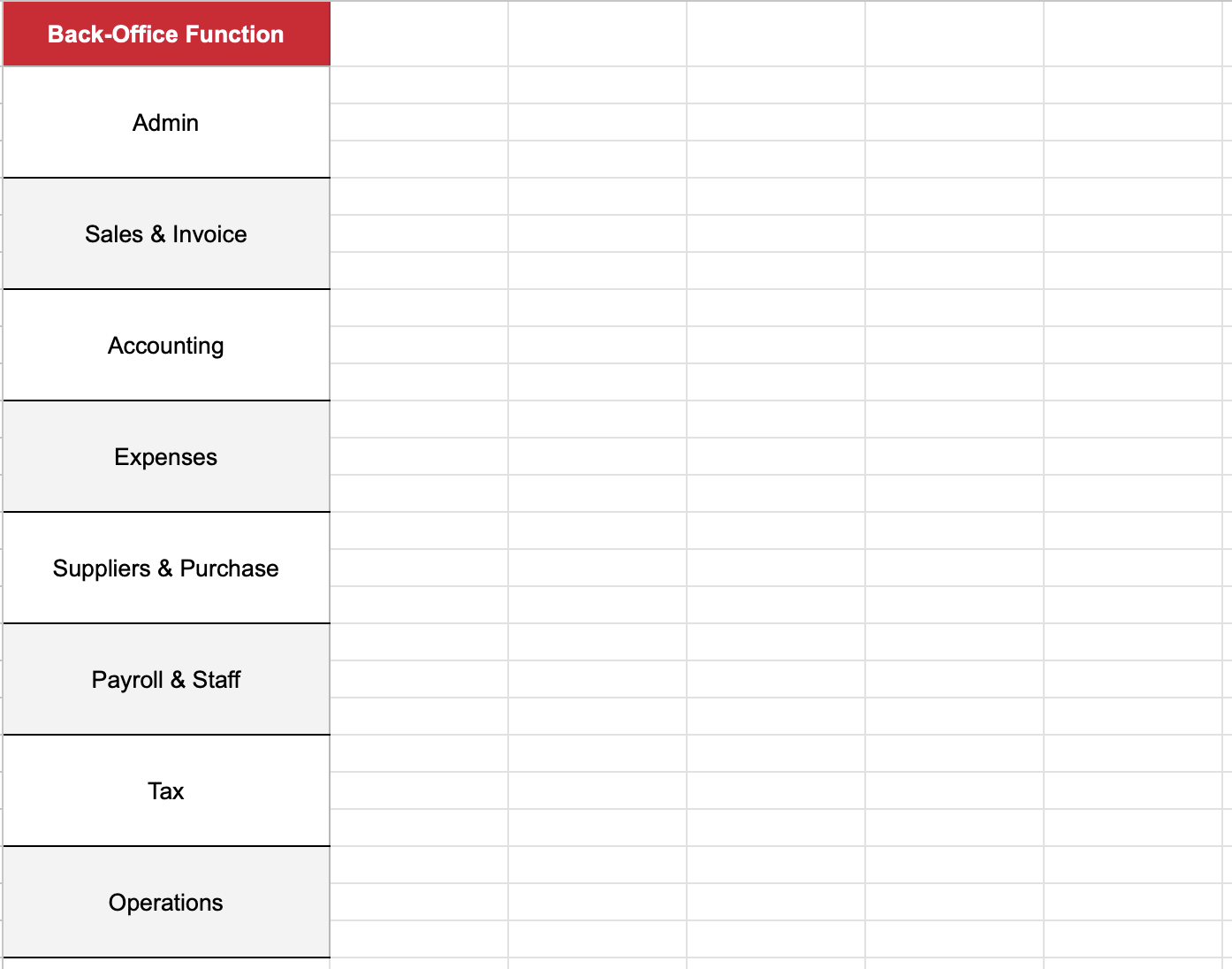
For starters, list down the areas that need to be handled regularly. These are the most common ones for Singapore SMEs.
Step 2: List out all your back-office tasks
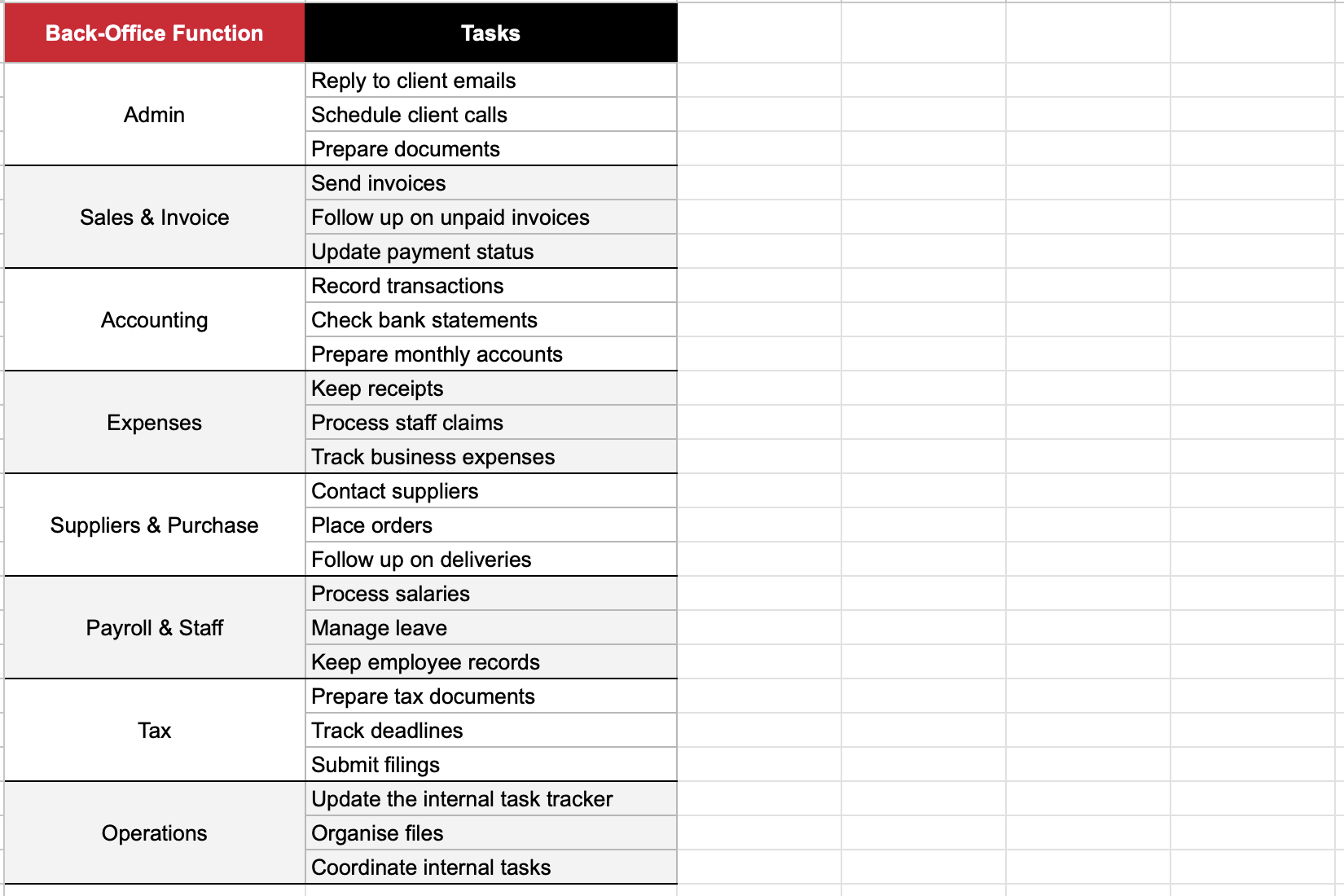
Now start by listing out all recurring back-office administrative and operational support tasks your business currently handles, including those being managed informally:
Step 3: Assign an owner to every task
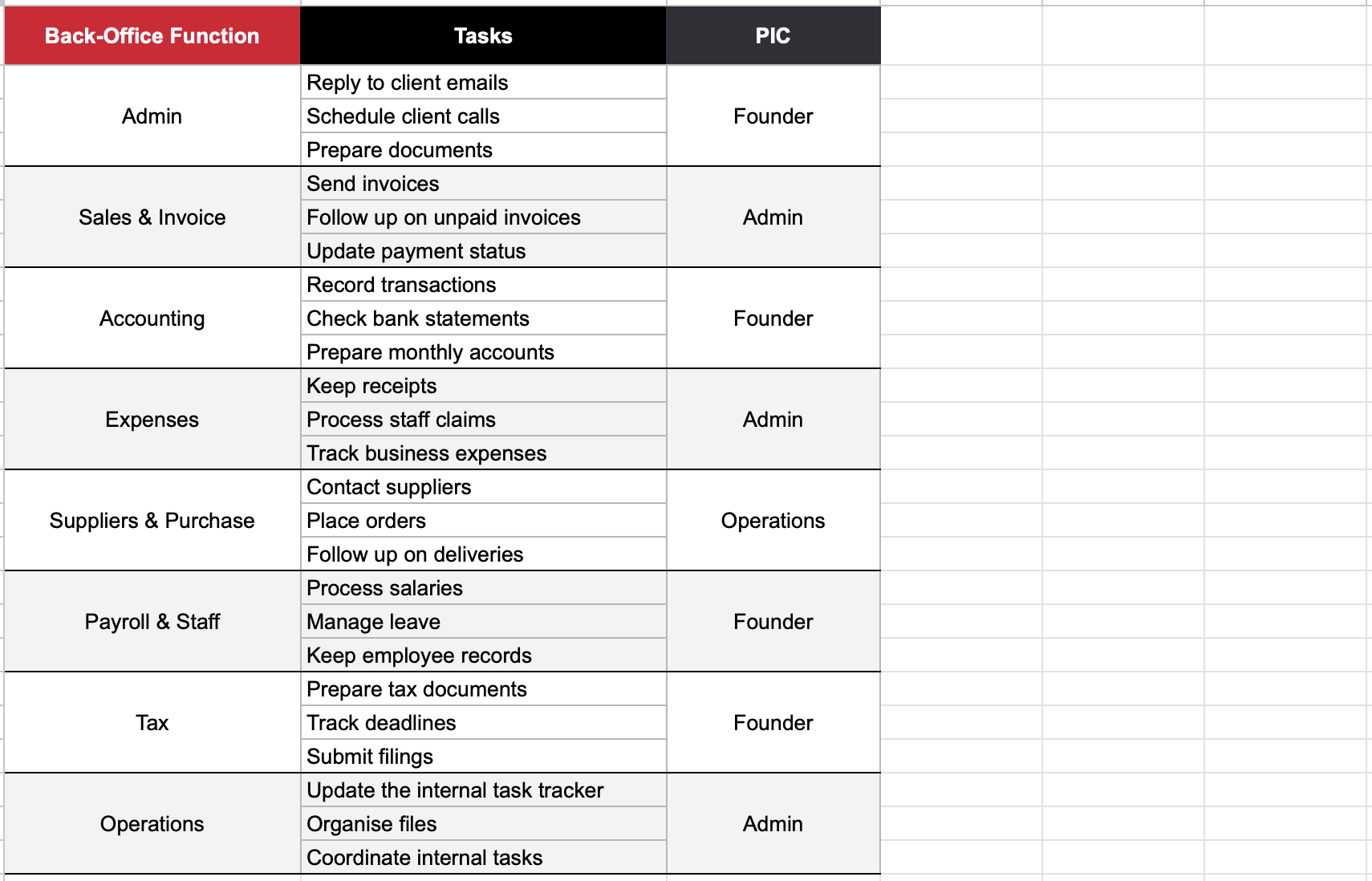
Now put a name or role next to each task. This makes it clear who is responsible.
Step 4: Decide when it needs to be done
Next, add the frequency of work that needs to be done.
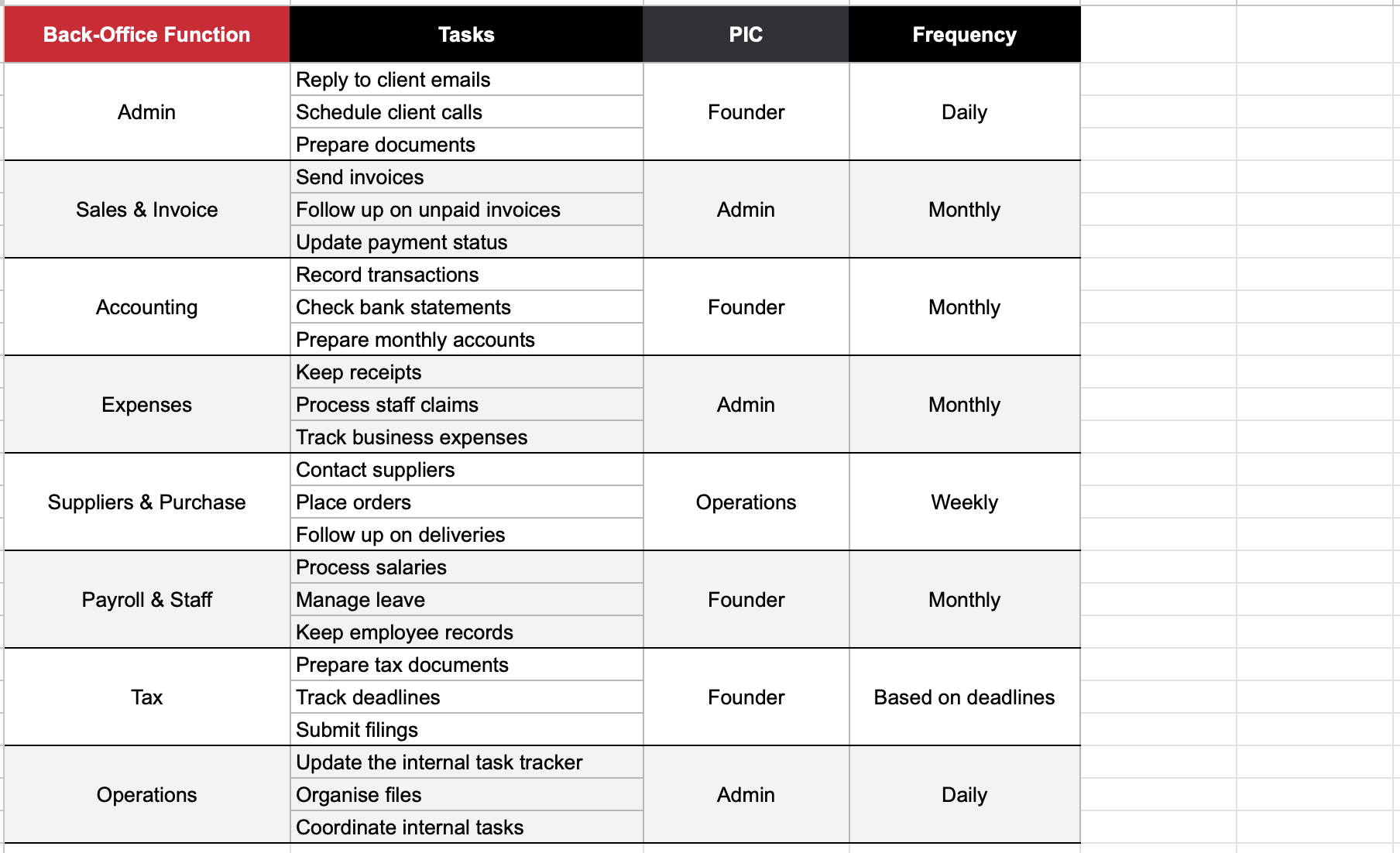
Step 4: Estimate the hours per day
This is where you start seeing how much time your back-office operations actually take.
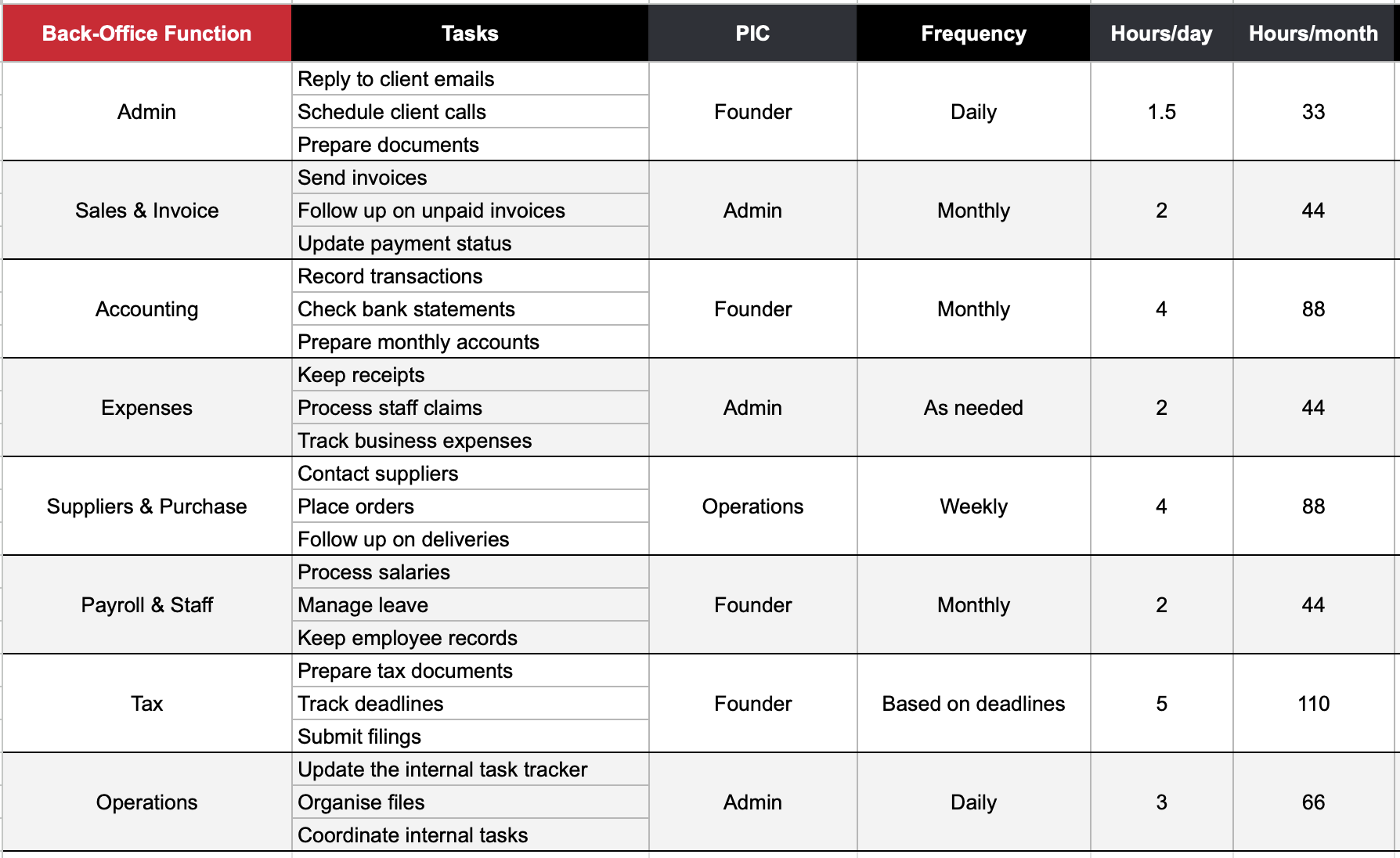
Step 5: Decide how the work gets done
Now make each task easier to manage. For most SMEs, this can be as simple as deciding what tool, method or process the team should use.
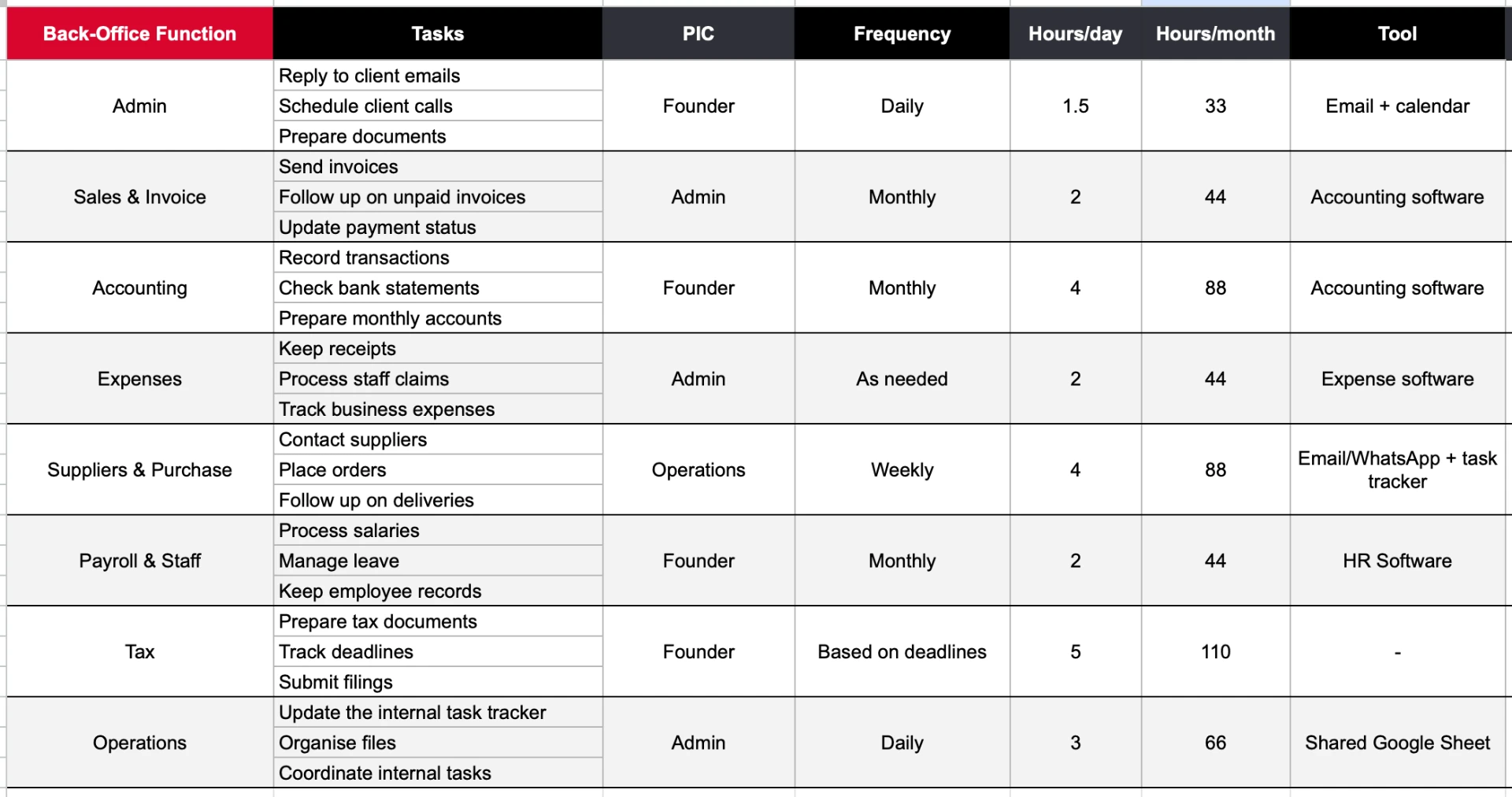
If you’re working on improving your existing back-office operations instead, this is a great time to look at whether your tool can be automated to lighten your workload. For example, if you’re using a PDF to manually create invoices, consider an invoice or accounting software that automatically generates monthly invoices.
Step 6: What you should handle and what you should outsource
Once everything is listed, you can see which tasks your team can comfortably handle and which ones may be better left to someone else.
💡 A rule of thumb is to keep activities that require close involvement with your business in-house, while considering outsourcing specialised or repetitive work such as bookkeeping, payroll or compliance.
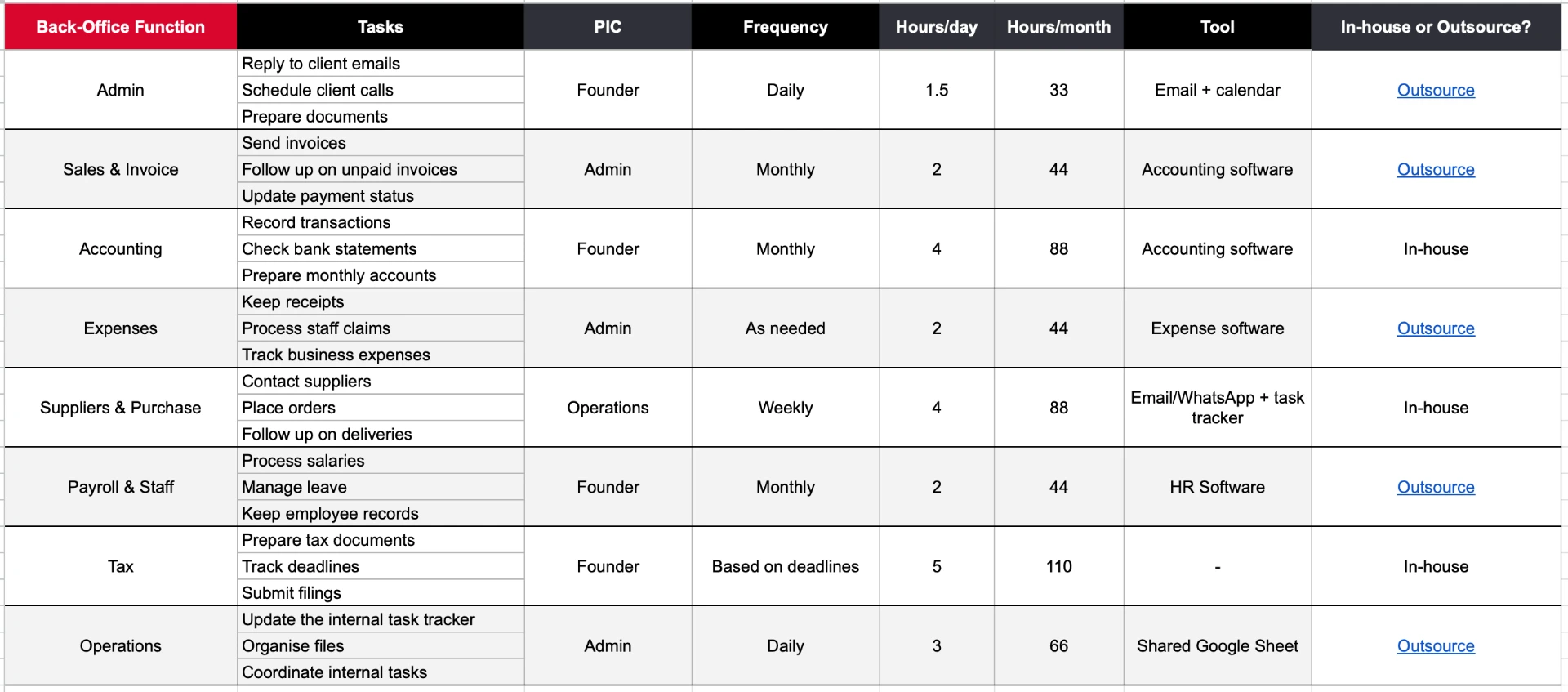
You can also decide by comparing the monthly workload with the capacity of a full-time employee. A full-time employee has roughly 174 working hours per month based on a 40-hour work week. But if a particular back-office function only takes 40-80 hours a month, hiring someone full-time just for that function may leave a significant amount of their working time unused.
This is where outsourcing can make sense. Instead of hiring for a full-time capacity, you can pay for the specific accounting, payroll, admin or compliance support you actually need.
But these aren't hard rules. The type of work matters too. For example, 40 hours of tax or accounting work may be worth outsourcing because it requires specialist knowledge, while 40 hours of general admin could simply be assigned to an existing employee.
Why You Should Leave Back-Office Operations to Gateway of Asia
Following the steps above will get your back-office business operations in order, but it still takes time to set up, manage and review each month. As one of the top back-office service providers in Singapore, Gateway of Asia will handle that and more for you. Here's what working with us looks like:
- Reliable administrative support, from day one: With a track record of supporting 1,000+ companies across 30+ countries, we already know how to plug into recurring admin work fast.
- Customised solutions based on your business needs: Instead of building your own back-office system from scratch, we map your admin and operational needs to a plan that fits, so you skip the trial-and-error of figuring out what to do yourself.
- Efficient task management: Recurring tasks like email follow-ups, document coordination and client follow-ups are tracked and handled consistently every month, without you needing to build or maintain a tracking system.
- Cost-effective alternative to hiring full-time staff: Plans start from S$300/month, well below the cost of a full-time hire once you factor in salary, CPF contributions, leave entitlements and management overhead, so you skip the hiring decision entirely.
- Support that scales as your business grows: Move from Silver (6 hrs/month) to Gold (8 hrs/month) to Platinum (10 hrs/month) as your workload increases, so you skip the “review and adjust monthly” step yourself; we do that adjustment with you.
- One dedicated point of contact: You work with the same person consistently, so there's no re-explaining your business to someone new and no time lost managing multiple vendors across admin and ops.
Ultimately, what we offer frees up valuable time for what actually grows your business, be it sales, strategy or clients.
Whether you're a founder buried in operational tasks, a foreign business owner managing remotely or a growing SME without dedicated admin staff, speak to our team and we’ll figure out the right level of back-office business operations you need for exactly where your business is right now.